Panels

Interface reference

The observatory’s panels, named and annotated — so documentation, issues, and support can refer to each view precisely. Screens are from VS Code; JetBrains mirrors them.

01

The workspace

Every region and toolbar, called out on one screen: the Claude Edits sidebar and the editor on top, the Claude Observatory bottom panel below, and the status bar along the bottom.
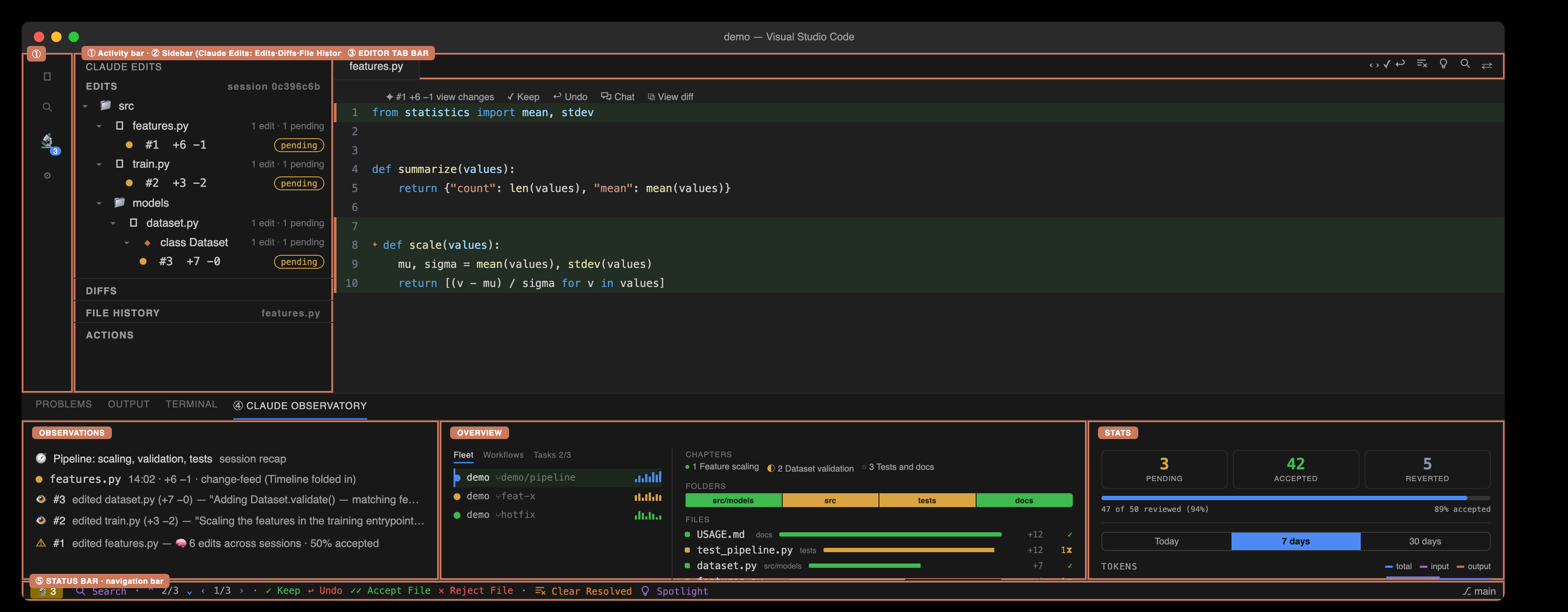
The workspace with a coral callout box on every region: ① activity bar, ② Claude Edits sidebar (Edits · Diffs · File History · Actions), ③ editor tab bar, ④ Claude Observatory bottom panel (Observations · Overview · Stats — Actions now lives in the Claude Edits sidebar), ⑤ status bar with the navigation bar
02

The panel views in detail

The observatory’s own views, with every part named: the Observations · Overview · Stats panes of the “Claude Observatory” bottom panel, plus Actions, which lives in the Claude Edits sidebar.
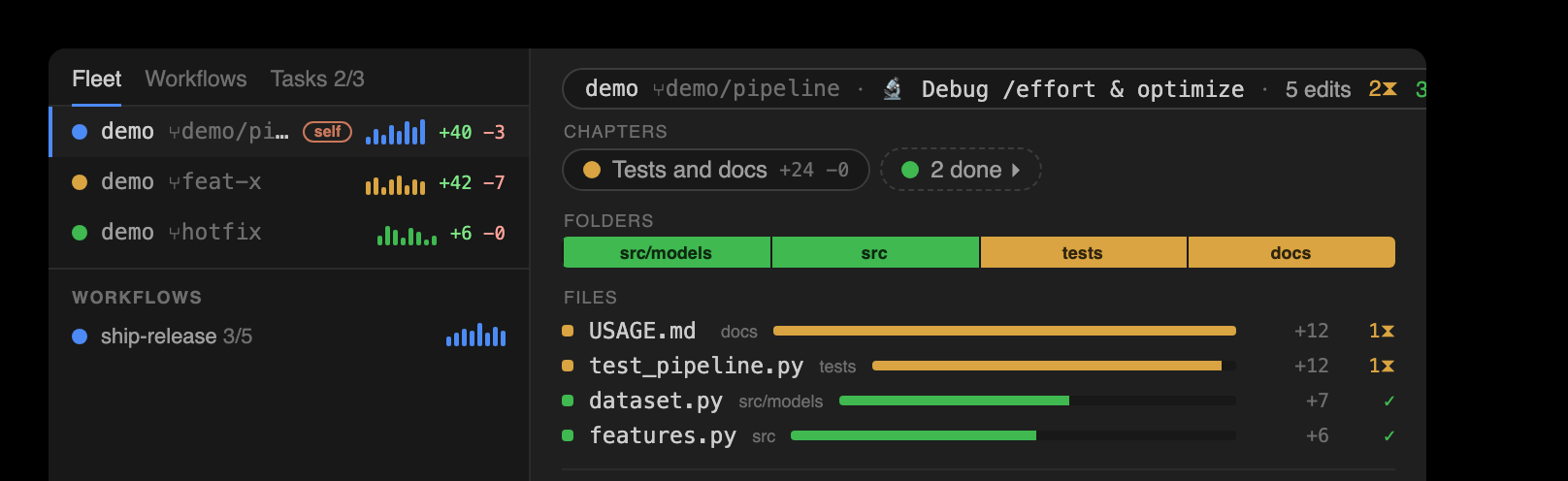
Overview master-detail · the fleet and the change-map

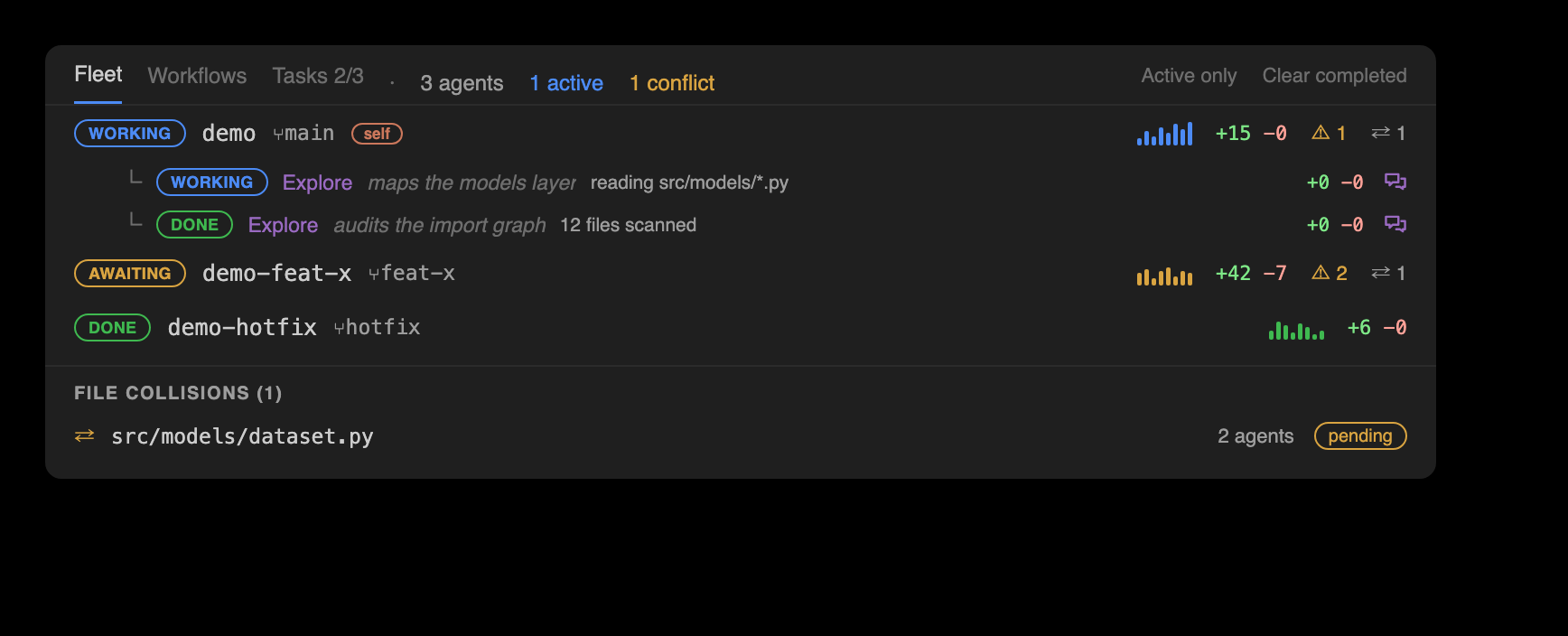
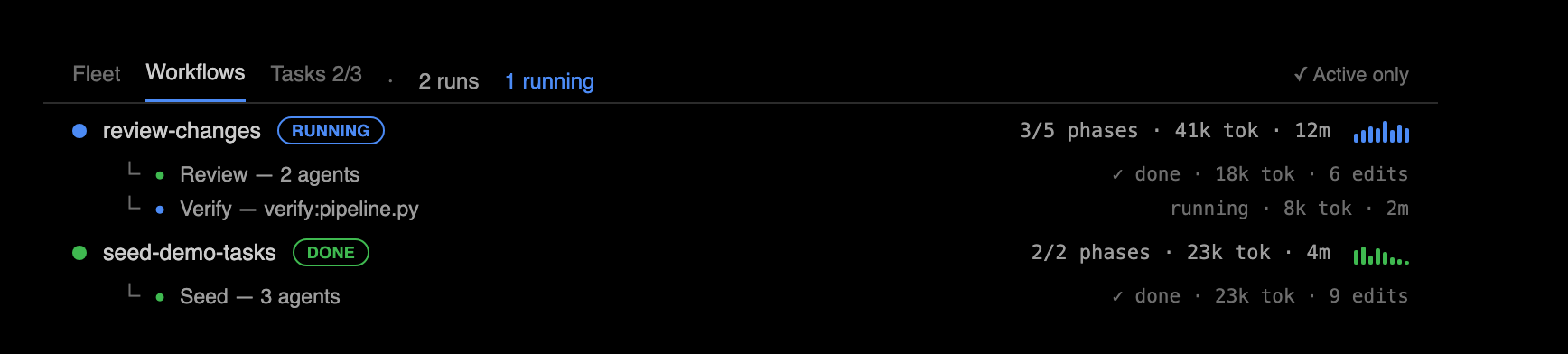
Overview panel, master-detail. LEFT NAV (~25%), three tabs, each opening with a one-line description of what it shows (tabs and change-map sections also carry hover descriptions): 1 Fleet — every running agent across the repo's git worktrees, each with a live phase badge (working / awaiting-input / awaiting-permission / idle / errored / done; heuristic phases carry a ~ marker — inferred from inactivity), worktree + branch, an activity sparkline, ±diff, tokens·time, risk and a collision badge, unfolding to nested subagents (agentType/description, phase, current task + to-dos, ±lines, a chat button); 2 Workflows — each multi-agent workflow run, with an informative name, running/done, per-phase progress groups and its agents (tokens·time·edits) over a matching sparkline; 2b Tasks — the session's numbered task list (Claude's TaskCreate/TaskUpdate tasks) with live statuses, a done badge, and strikethrough on completion; plus an Active-only toggle (which also hides completed tasks) and Clear-completed (dismisses, never deletes). RIGHT DETAIL (~75%): 3 the selected agent's change-map, in three labeled sections top to bottom — Chapters, a ribbon of subtask chips (each a to-do/task Claude worked, showing its lines / edits / pending; chapters are total — work outside any to-do appears as a dimmed synthesized session chapter titled from the session's goal, reviewable like any other; duplicate to-do titles render as separate rows); Folders, a proportional strip of tiles, one per changed folder (tile width = lines changed, color = review status); and Files, a churn-ranked ledger of every changed file (±line bars colored by review status). Clicking a Folder tile or a Chapter chip navigates the matching nav-bar axis, opening that folder's or chapter's first pending edit. A bottom summary bar reports the pending / accepted / reverted edit counts plus file and folder totals for whatever is currently in scope, and names the current chapter (or folder filter). NAV BAR: 4 the review toolbar, now two rows. Top row (controls): the session selector — showing the session's human-readable name, its title or first prompt, with the raw id in the tooltip — then the session-wide bulk actions Accept All · Revert All · Clear Resolved · Export, and on the right Search · Active only · Spotlight · Refresh. Bottom row: four review axes that step the pending edits at four granularities — Diff axis steps the open file's edits, carrying Keep, Undo, Chat (hands this edit's context to your Claude), View diff (opens a real side-by-side diff editor) and the current edit's relative time; File axis steps changed files, showing the filename and that file's edit count, with Accept/Reject File; Folder axis steps changed folders, showing the folder and its file/edit totals, with Accept/Reject Folder acting on that folder's edits only; Chapter axis steps the session's subtasks (chapters, from Claude's to-dos/tasks), showing the chapter's folder/file/edit totals, with Review, Accept Chapter, Reject Chapter and Chat — labeled, color-coded, one icon per action
Phases marked ~ are inferred from inactivity, never asserted. The nav bar carries the session controls on its top row and four review axes — Diff, File, Folder, Chapter — on the bottom; the change-map’s Chapters, Folders, and Files sections mirror them, and clicking a folder tile or chapter chip drives the matching axis. The chapter ribbon is total — work outside any to-do lands in a dimmed session chapter, reviewable like any other.

Overview → Fleet every running agent, live

The Overview's Fleet left-nav tab (formerly the Multitasking window): 1 per-agent rows — each running agent across the repo's git worktrees, with a live phase badge (heuristic phases carry a ~ marker), worktree + branch, an activity sparkline, ±diff, tokens·time, risk and a collision badge; 2 nested subagents (agentType/description, phase, current task + to-dos, ±lines, a chat button); 3 live cross-agent file conflicts (shown in the Actions view)

Overview → Workflows multi-agent orchestration runs

The Overview's Workflows left-nav tab: one row per multi-agent workflow run — an informative name, a running/done badge, phase progress with tokens and elapsed time, and an activity sparkline — unfolding to per-phase groups and their agents (tokens · time · edits). Selecting a run drives the right-hand change-map detail with that run's chapter rollup and files
Each workflow run maps its agents’ edits into the same change-map detail as any fleet agent.

Overview → Tasks the session’s numbered task list

The Overview's Tasks left-nav tab: the session's numbered TaskCreate/TaskUpdate tasks, newest first — a status glyph (in-progress / done with strikethrough), the task number and subject, the in-progress task's active form in italics, and per-task +added −removed and edit counts joined from the task's chapter. Completed tasks fold behind an 'N done · show all' row, and the Active-only toggle hides them outright
Tasks link to chapters: each task’s row carries the live ± and edit counts of the chapter it planned, and reviewing that chapter reviews the task’s edits.

Observations the change feed · Claude's reasoning

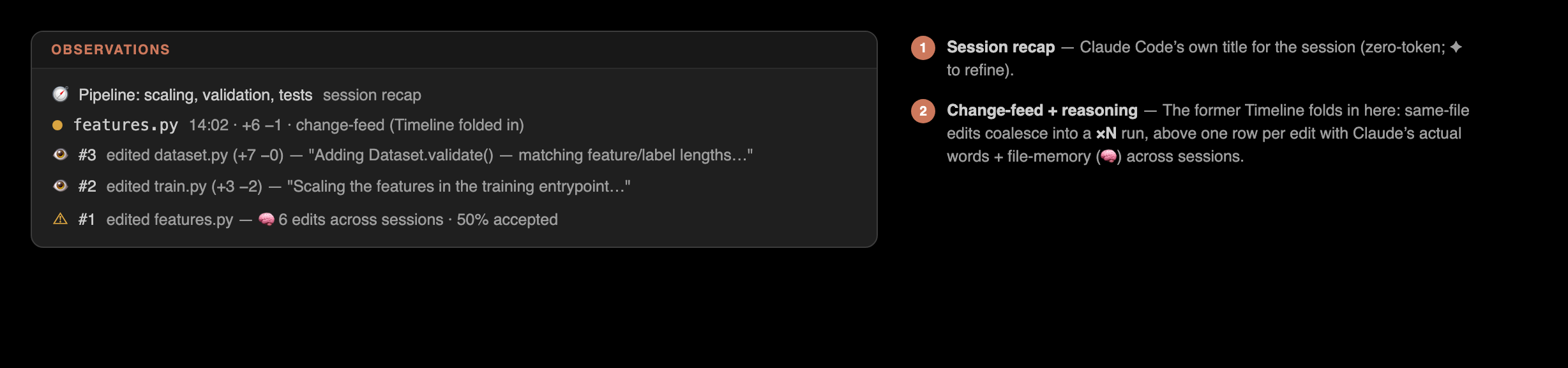
Observations panel: 1 session recap, 2 the coalesced change feed (files ordered by recent activity; adjacent same-file edits collapse into a ×N run) — the former Timeline is folded in here, 3 per-edit reasoning rows with flags and file-memory, 4 next steps

Stats progress & usage

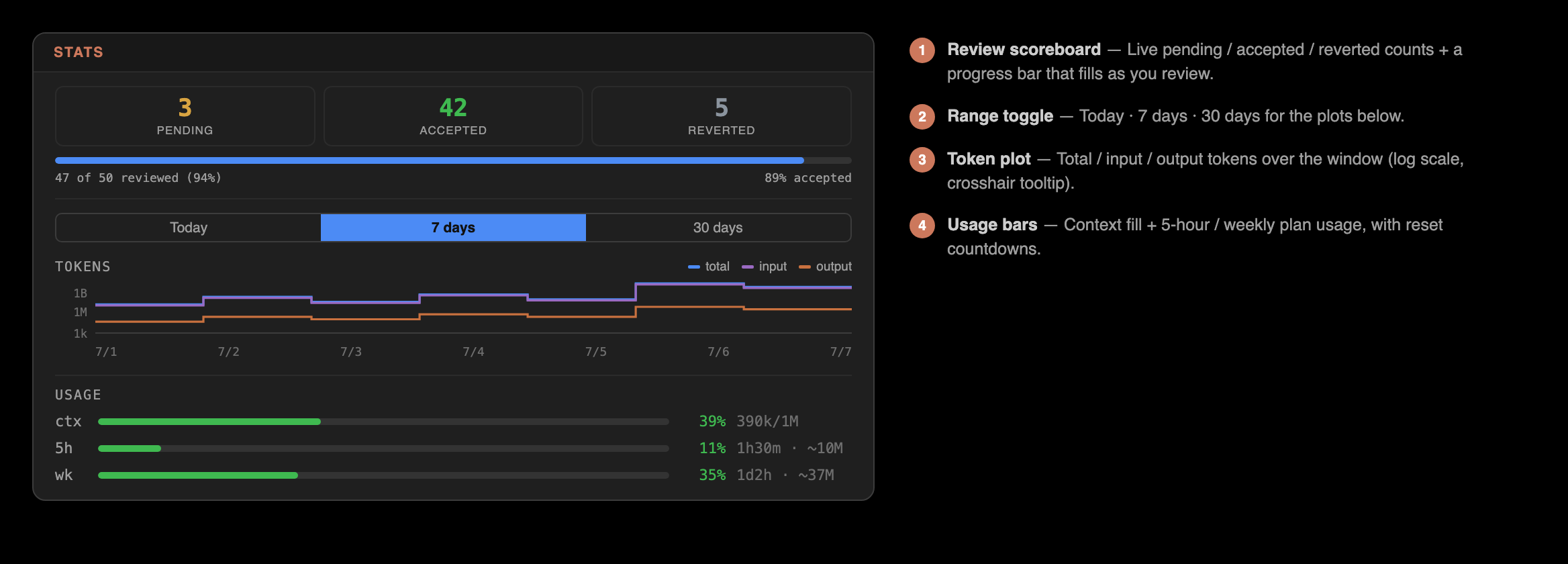
Stats panel: 1 review scoreboard (the session shown by name, not its id), 2 range toggle, 3 token plot, 4 usage bars — the Usage 5h and weekly rows now show an estimated used / total, the 100% total inferred from tokens ÷ percent

Actions every tool call — in the sidebar

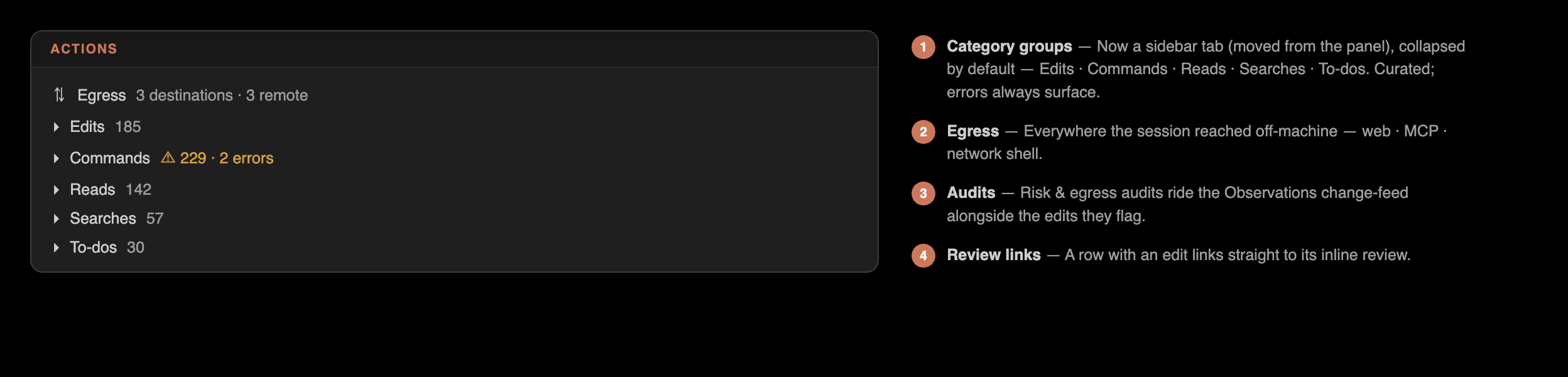
Actions view — now in the Claude Edits sidebar, not the bottom panel: every tool call Claude made, grouped by category (Edits · Commands · Reads · Searches · Web · To-dos · Egress) and collapsed by default — led by a Live-conflicts section (files touched by 2+ active agents, click to open) that starts expanded; errors always surface, a Show-all toggle reveals the low-signal categories, and edit rows link to their review. The Risk and Egress audits ride the same timeline