Inline review
Inline review surfaces pending edits in the editor itself, under a floating review bar.
Inline review carries the review controls into the file itself. A pending edit appears as a tinted line with a gutter star, removed lines as ghost text, and a per-edit lens naming the edit, its churn, and its position — with the decision verbs right there.
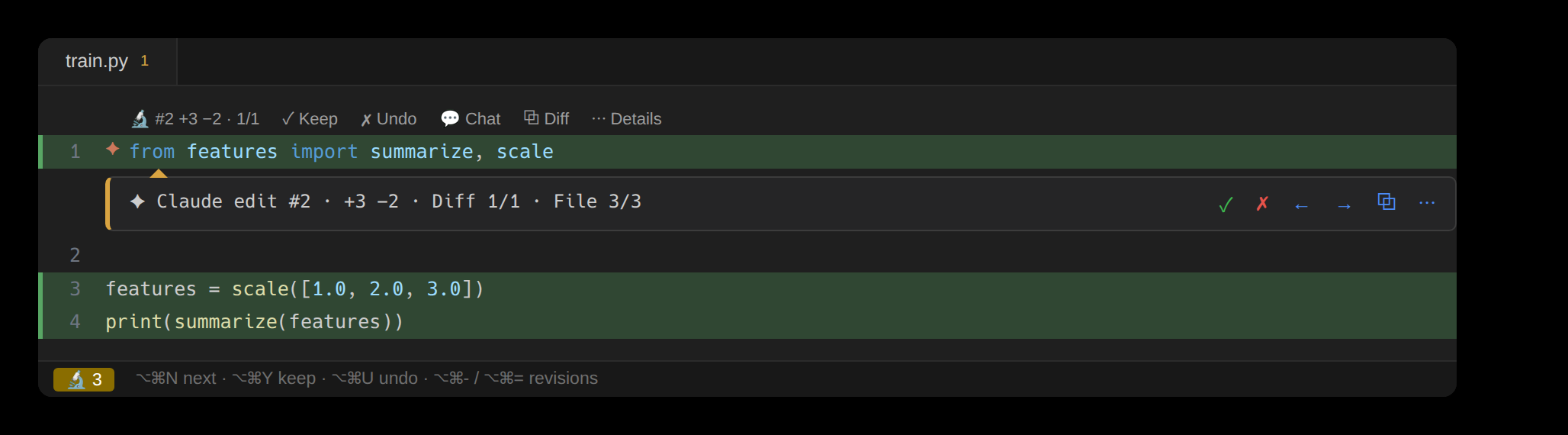
The review bar
Which surface carries the verbs depends on the editor's API. JetBrains IDEs expose a floating-toolbar layer, so the controls sit as a floating toolbar over the editor whenever the open file has edits awaiting review: Keep, Undo, Chat, View diff, the Diff counter and its steppers, the file-wide accept and reject, Spotlight, and Clear Resolved.
VS Code exposes no floating-widget API — a comment thread is the only interactive surface that can float over code. So it uses a compact bar built on exactly that: a single row of Keep, Undo, the edit and file steppers, Diff, Chat, Spotlight, and a ⌄ that opens the review bubble — the agent's reasoning and the diff in git's colors, one click away on Details and back on the collapse chevron.
A file with edits awaiting review carries their count in the editor's project tree — and on the editor tab in VS Code — so unlooked-at work is visible without opening any panel. Keeping or reverting an edit opens the next one still awaiting review, crossing files when needed; it's a setting, on by default in both editors.