The stacked diff view
“Open all in editor” stacks every pending diff into one scroll, each with its own verbs.
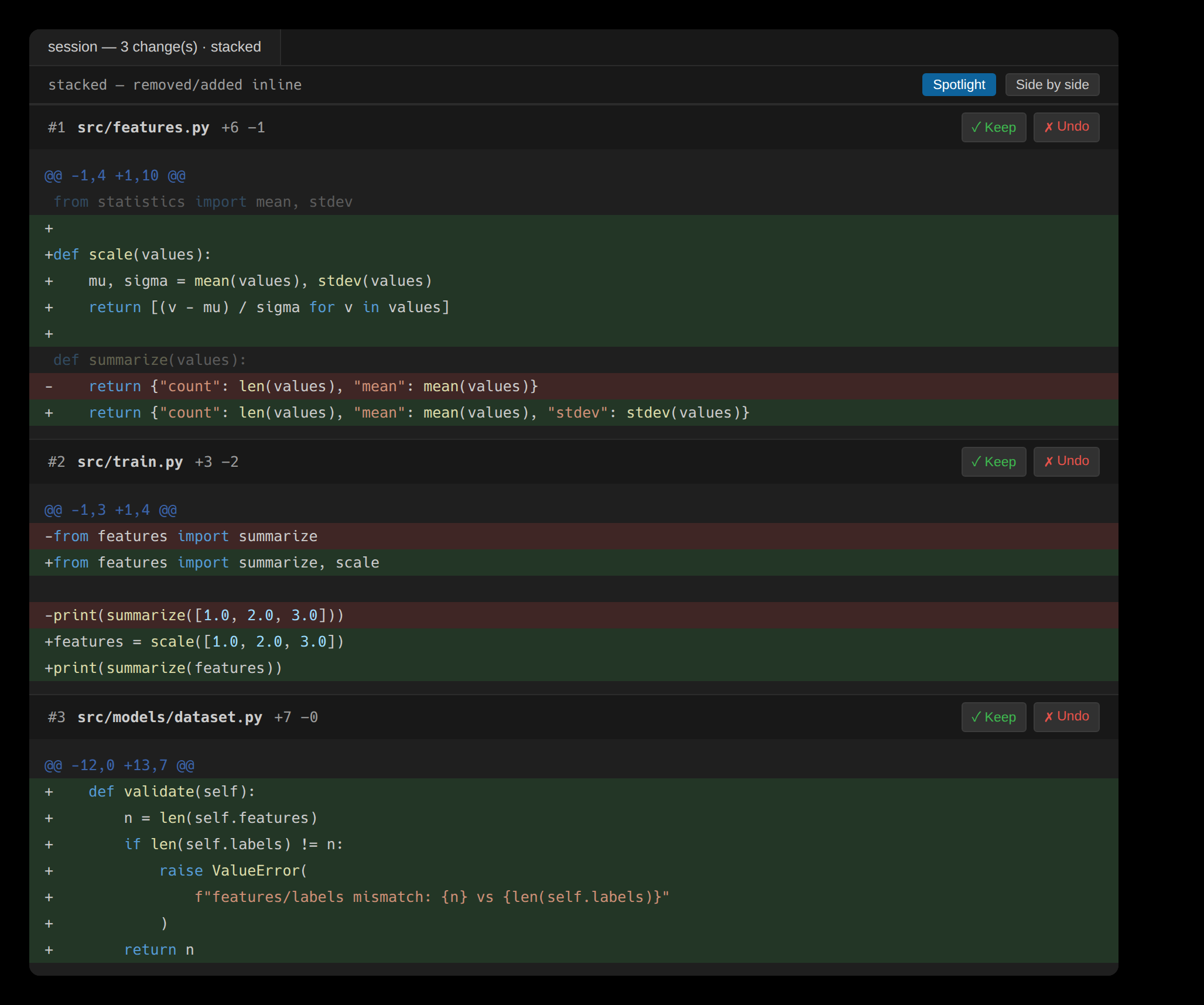
Reviewing edits one file at a time is right when you want to weigh each on its own. Sometimes you want the whole change in front of you instead. Open all in editor — from the Traces sidebar or the review toolbar — reads every pending review unit as one concatenated scroll: each edit's diff stacked below the last, each still carrying its own Keep and Undo.
Net diffs, not raw history
Each block is the unit's net change — repeated revisions of the same lines are already collapsed into one review unit, so a line the agent rewrote five times appears once, in its final form. The block header names the file, the edit number, and its +A −R churn; the diff below is the agent's own, in the same colors the inline review uses.
Decide at any scope
The verbs work exactly as they do everywhere else, gathered into one view. Keep or Undo on a block resolves that one unit and leaves the rest standing; the toolbar's Keep all / Undo all resolve the whole scroll at once. A resolved block drops out of the pending set — reflected immediately in the Traces sidebar and the Overview's counts.
A single unit that rewrote thousands of lines is a wall in any stacked view. OAK bounds each block to a readable window and marks where it was cut, so one enormous edit can't bury the others below it.