The herdr tab
The herdr tab runs the real terminal client for agents and remote machines.
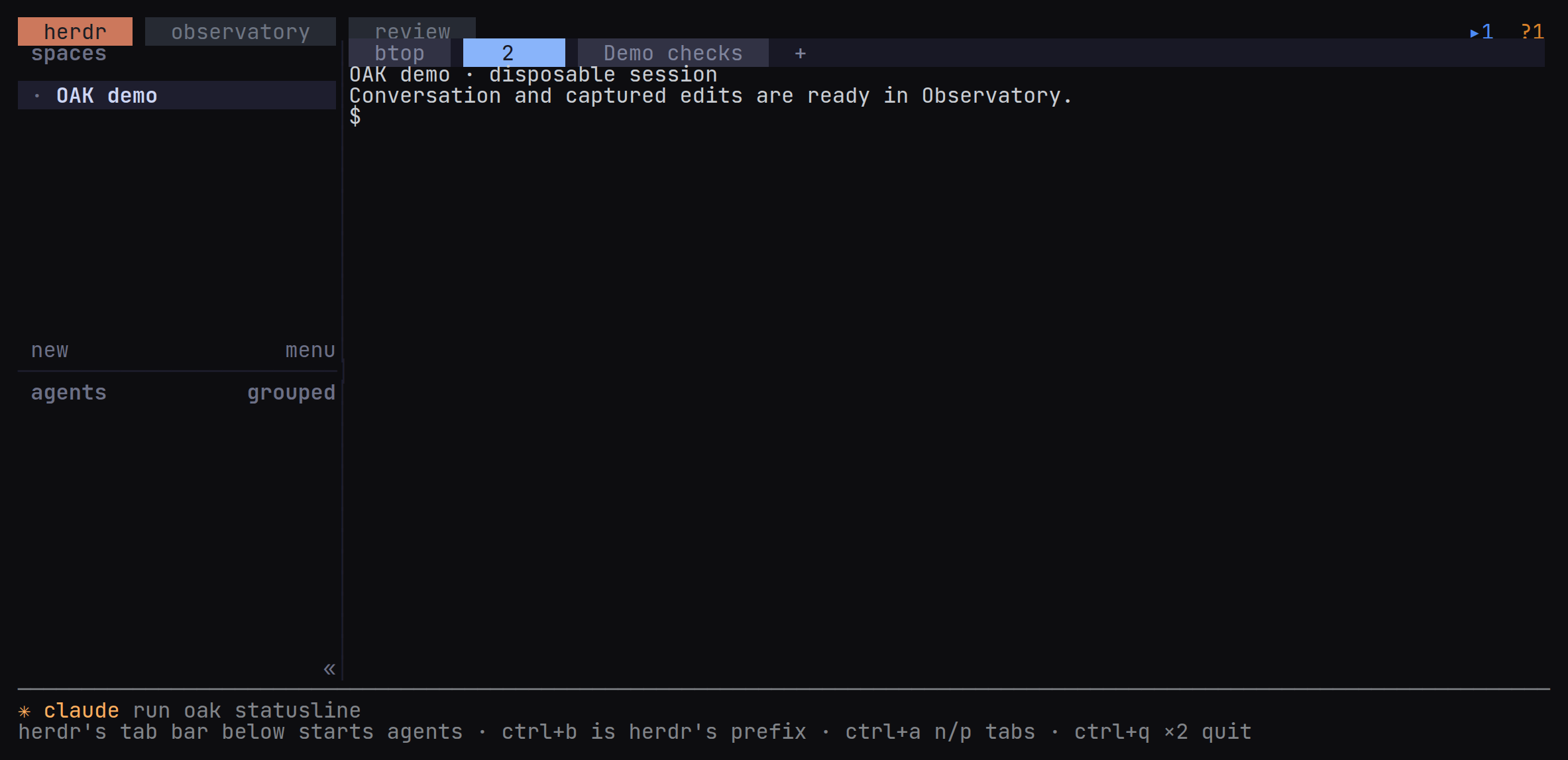
The herdr tab runs herdr’s real client inside an OAK native terminal. Use it to create terminals, run agents, switch machines and answer permission prompts.
OAK’s outer bar has three fixed tabs on one row; herdr’s own tab bar sits below it. Inside a herdr pane (as oak attach runs it) the herdr tab is absent: herdr is the host, and its own keys move between its tabs. ctrl+b is herdr’s prefix (inside tmux, send ctrl+b twice). ctrl+a then n/p or 1–3 switches OAK tabs. ctrl+q twice quits OAK from any tab, including while herdr owns the keyboard; ctrl+a then q twice does the same. Either chord asks for the repeat within two seconds.
In the terminal app a session starts here, in herdr’s own tab bar and sidebar, on the selected machine. The VS Code and JetBrains timelines keep their own new-session control, which starts the agent in a herdr terminal.
Installation
Installing OAK installs herdr: the installers provision the checksum-verified version in herdr.lock, currently 0.9.1, and preserve a newer installed version. oak doctor --fix repairs the backend, integrations, plugin, missing sidebar widths and native terminal helper permissions, and sets gruvbox as the default when no theme name is set. oak doctor also reports a herdr server that was started from inside a Claude Code session, because every Claude Code agent opened in its panes then runs as a child session with transcript saving off; stop it from a plain terminal with herdr server stop, then oak doctor --fix.
Conversation navigation
OAK’s configured leader key (ctrl+a by default), then o, selects and pins herdr’s focused conversation in Observatory. herdr’s Open in OAK plugin action selects the focused pane’s conversation in Observatory. From Observatory, h focuses the selected live pane in herdr.
In the herdr tab, ctrl+a twice sends one ctrl+a to the program in the pane, where Claude Code and Codex both use it to go to the start of the line. Otherwise the leader takes only a plain key next, so ctrl+a ctrl+k does nothing.
Machines
oak machine add build-box user@host
oak machine list --json
oak doctor
herdr provisions the target over SSH and forwards terminal operations. Review requires the files, transcripts and store on the host where capture runs. Usage is measured on each machine for itself (SECURITY.md lists the account reads). The doctor suggests SSH connection reuse when forwarding exceeds eight seconds. See Remote development.
Agents in a remote machine’s panes keep running when the laptop sleeps, disconnects, detaches or quits OAK, provided that machine’s herdr server outlives the SSH login that started it. On a Linux host whose logind sets KillUserProcesses=yes, a server started inside an SSH login stops with it, together with every agent in its panes; oak doctor --fix starts the server in a user scope of its own instead. Agents on the laptop itself stop while it sleeps. See Keeping agents running when the laptop closes.
Terminal ownership
herdr owns agent terminals. OAK’s local focus server routes navigation only; stopping or replacing that endpoint does not stop herdr’s agents.
Tab names and the btop tab
OAK names herdr’s tabs after the sessions their panes run, and renames a tab when its session’s title changes: a rename, a new title from Claude Code or Codex, or the title claude.ai gives a Remote Control session. A tab is named when its label is one nobody chose: the number herdr gives an unnamed tab, an agent kind such as claude or codex, the title the agent gives its own terminal, or a title OAK set earlier. A tab you rename keeps your name.
While the terminal app runs, it names the tabs on this machine, and has the OAK on every saved machine name the tabs there, so they go on following their sessions after the app closes. A session whose capture hooks never ran in its pane on that machine (OAK’s hooks are not installed there, or the session began before they were) is one that machine cannot name, so the app names its tab itself. It does not need to be open: each session’s capture hooks rename that session’s own tab, on the machine where it runs, when a turn starts or ends and when a Codex session resumes, and OAK’s Claude Code status line, where it is installed, does the same when the title it shows changes.
On Linux and macOS, each machine’s home workspace, or its first workspace when none is labelled home, keeps a btop tab running a system monitor: btop, else bpytop or htop, as found in that pane’s shell, which must be a POSIX shell such as bash or zsh. OAK labels the monitor’s pane btop too, and that pane is the only one it types into: a pane you split off beside the monitor stays yours. OAK makes the tab again whenever it is missing, for example after the monitor quits, starts the monitor when the pane’s shell is idle at the prompt, and never closes a tab. When an agent runs in the monitor’s pane, OAK leaves it alone, names the tab after the agent’s session (or its kind until the session has a title) and opens a new btop tab.
When herdr’s server restarts, for example after a reboot, the monitor’s pane comes back as a plain shell. On Linux and macOS, OAK’s herdr plugin starts the monitor in it again as herdr’s server starts, before OAK runs; it types only into that pane’s idle shell and never makes a tab. The installers, oak update and oak doctor --fix link the plugin on the machine they run on. Like herdr’s agent hooks, it needs python3; herdr plugin log list shows its runs.
cmd+w to close a herdr tab
Add this to ~/.config/herdr/config.toml (merge it into an existing [keys] table), then reload herdr’s config from its menu. cmd, command and super are interchangeable on every platform; only the label herdr prints differs, super on Linux:
[keys]
close_tab = "cmd+w"
herdr --help shows the resolved config path; HERDR_CONFIG_PATH can override it. This closes the selected tab in herdr’s own bar. OAK’s outer tabs still use ctrl+a then n/p or 1–3.
The terminal must support the kitty keyboard protocol and pass cmd+w through to herdr. In Ghostty, add keybind = super+w=unbind to its config to remove the terminal’s binding. In kitty, iTerm2 or WezTerm, enable the protocol where needed and remove the terminal’s own close-tab shortcut. Terminal.app cannot send this chord through the protocol.