The Traces sidebar
The Traces sidebar lists every pending edit, grouped by file, with Keep and Undo on each row.
The Observatory Traces sidebar is the review surface that lives in the editor's own view column — a tree of every pending edit, grouped by the file it touched, with the decision verbs on every row. It carries the same review the terminal app does, rendered as a tree beside your files rather than a dashboard.
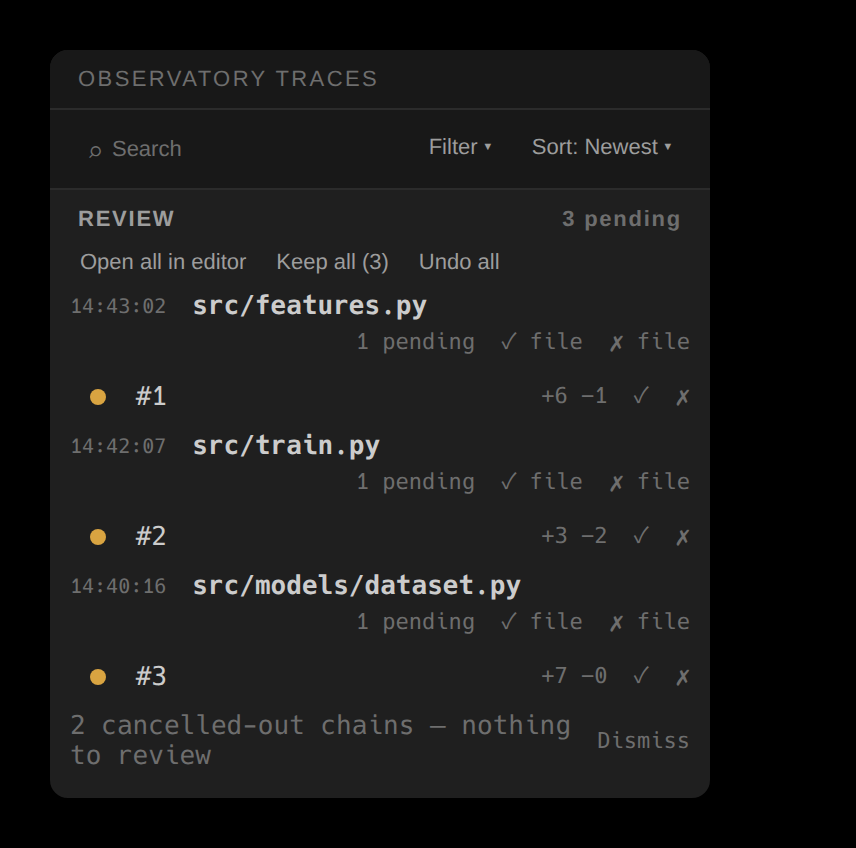
Grouped by file
Every row is one review unit — one piece of code, however many times the agent revised it — filed under its path. A file header carries that file's pending count and its own ✓ file / ✗ file actions, so a whole file can be accepted or reverted without opening it. Each unit beneath shows its +A −R churn and its per-unit ✓ / ✗.
Filter and sort
The header carries inline controls: a search field (a substring, or a regular expression the moment the text carries regex syntax), a filter dropdown for the file-type buckets and extensions — Code, Tests, Config, Docs, Styles, Other — and a sort dropdown (four orders — newest, oldest, name A→Z, name Z→A). The filter names what it is narrowing by and the sort names the order. Each file header also shows the exact time it last changed. A filter only changes what the tree shows, never a decision or the store.
Act on one, a file, or everything
The actions above the tree scope by size. Open all in editor reads the whole pending set as one stacked diff; Keep all and Undo all resolve the entire list at once. Keep and Undo on a unit, or ✓ file / ✗ file on a header, act at exactly that scope — and every one is guarded, so an edit a sibling is still touching is protected.
Resolved rows stay visible
Resolving a unit doesn't erase it: a kept or reverted row greys out in place with a redo/undo affordance, so a decision is reversible and the history stays legible. Revision chains that net to nothing — an edit the agent wrote then took back — fold into a cancelled-out footer you can dismiss. The sidebar never asks you to review code that no longer exists.
The tree, the inline review over the code, and the terminal app's review tab are the same decisions on the same store. Resolve a unit in any one and it shows resolved in the others.