The observatory tab
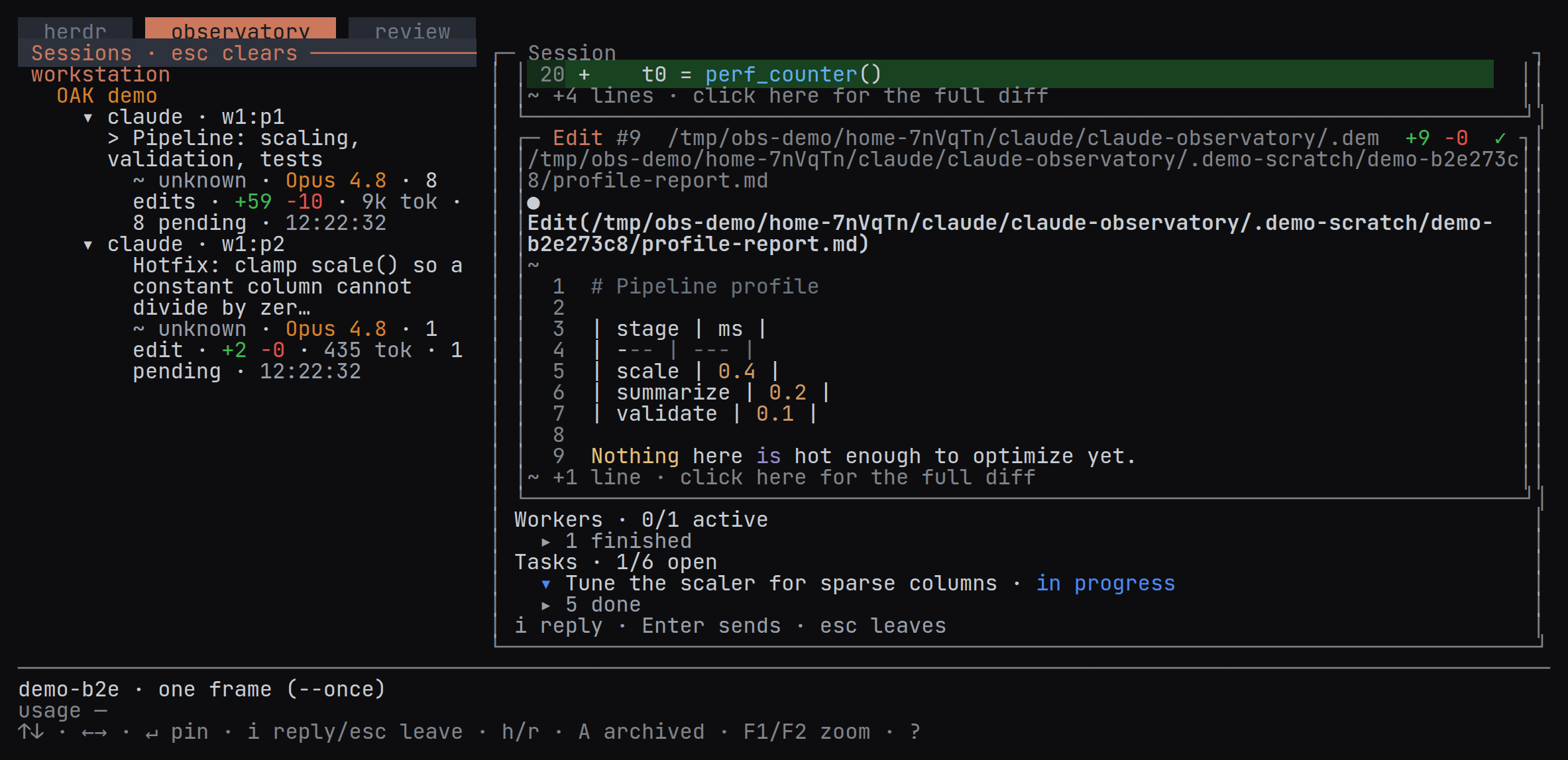
The observatory tab lists sessions beside a detail pane: a pinned conversation, workers, tasks and review links.
The Observatory tab lists each machine’s sessions, grouped by workspace, beside a pinned conversation detail.
Active and unresolved sessions
The tree joins herdr’s live panes with OAK’s captured history. Active panes and unresolved sessions remain visible. A resolved, inactive session is archived rather than deleted; Shift+A includes archived sessions again.
Under each machine, sessions are grouped by the herdr workspace their pane runs in, named as in herdr’s sidebar; each pane line keeps its agent kind and pane id. A session running outside herdr is listed under its project’s name, or under Unknown workspace when the project is unknown. Workspaces with a live agent or the most recent activity come first, and the workspace of the session OAK is watching leads its machine. Within a workspace, sessions are listed newest first, each with its status, model, edits, tokens, pending count and the clock time of its last activity.
Conversation detail
Click a session (its pane line, title or stats line) to pin its conversation. The arrow keys preview a header without pinning; Enter pins it. Either way, that session is the one the Review tab shows. Browsing other rows then leaves the pinned transcript in place. The detail shows each of your prompts in a box like the tool calls beside it, with its time on the box’s edge and its text whole on a grey ground, then the agent’s replies, reasoning, tool activity and captured edits. Workers and Tasks follow: each header counts the active entries out of the total, working or waiting workers and open tasks are listed in their state’s colour (a worker’s second line, with its model, edits and tokens, in the session list’s colours), and the rest fold behind one row that a click opens. A background agent counts as working until Claude Code logs it finished (failed, killed or stopped reads as errored) and again once it is resumed; with no such notice, it is done after it, its session and the session’s other agents have all been quiet for five minutes, unless it stopped on a tool call or a question, which reads as waiting.
A pinned conversation opens at its newest message and follows the tail as the agent writes. Scrolling back holds that position; End, or the ↓ newest control at the foot of the pane, returns to the tail and resumes following.
Drag across text in the session tree or a conversation to copy it, as in the herdr tab: the selection stays within the pane where it started, and releasing the button copies it to the clipboard. A prompt copies as its text, without its box. A click that does not move keeps its usual action.
Press h to focus a live pane in herdr, or r to review the selected session’s edits. Press i for the thin reply box; Enter explicitly submits the draft, and a failed send keeps it. Pinning another session keeps an unsent draft with its conversation until you pin that conversation again. A blocked agent, or a session with no live pane, offers no reply box — answer it in the herdr tab; review comments and quoted replies are copied to the clipboard instead.
Arranging the panes
Use split, resize and zoom to read more than one conversation. A click in the session list fills the conversation pane you focused, or the one the last pin filled. The current leader key and bindings are listed in Options and the ? help screen. Conversation rendering follows transcript changes independently of the machine list.
For a session on a saved machine, its conversation, title, model, tokens, pending edits, activity and diff previews come from that machine over SSH. Automatic reads wait at least ten seconds and back off when responses are slow. A local sync mirror never supplies those facts. When the owner cannot answer, the detail shows an error and, if a mirror exists, its last sync time. Older remote OAK builds produce an explicit update-required message.
Remote herdr tabs also take their session titles from the owning machine. Names refresh when its session catalog arrives; a local sync copy cannot rename a remote tab.