Sessions & agents
A session is the one conversation everything hangs off; agents are who worked inside it.
Everything OAK records hangs off a session — one conversation with a coding agent. A native session can spawn more agents, sit beside siblings in other git worktrees, or run as one arm of a workflow. OAK correlates all of them, so a fan-out reads as a single account of who did what.
Session
A session is one conversation with a coding agent. The agent assigns it an identifier and writes its transcript to disk; the observatory keeps one store per session and presents the session by name — the name you gave it (Claude Code’s /rename, or a rename on claude.ai or the Claude app), else the title claude.ai shows for it under Remote Control, else the agent’s own title, else its first prompt — with the raw identifier available in tooltips.
With Remote Control on, Claude Code keeps a session’s name on claude.ai and never writes it back to the transcript, so OAK reads those titles from your account (at most every five minutes, with Claude Code’s stored login) and caches them. Listings read only the cache; a failed read keeps the local names and oak doctor reports it. oak titles shows the last read, oak titles --refresh reads now, and oak titles --off turns the read off.
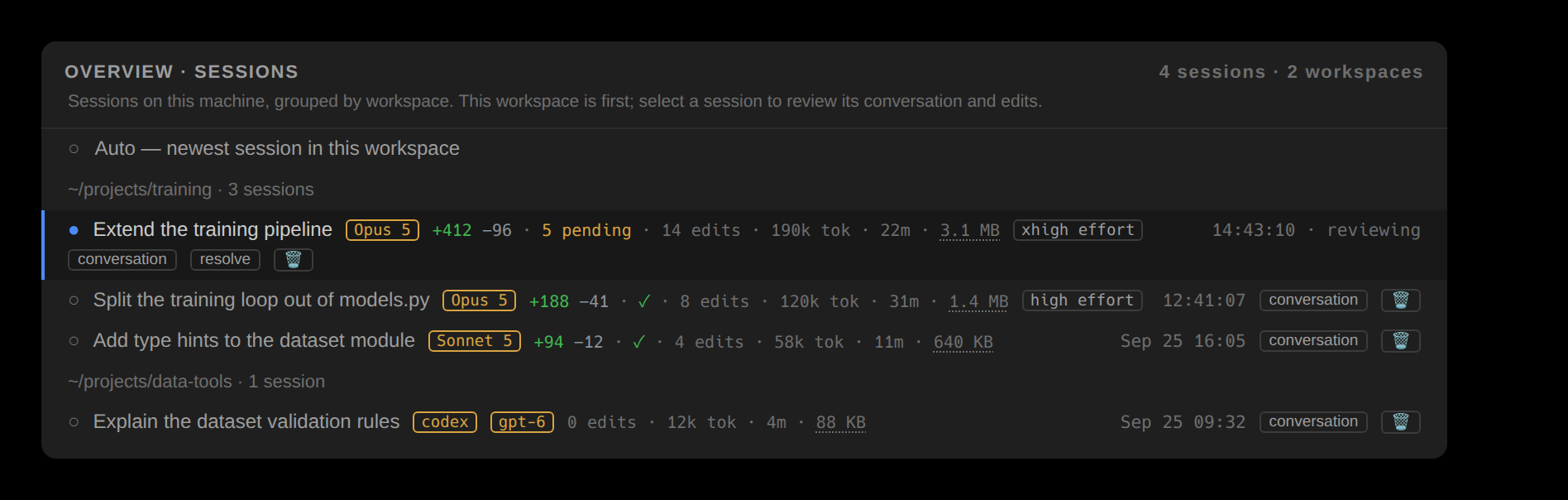
One session at a time is under review. The Sessions tab groups sessions by workspace on the machine where the editor’s workspace runs. The current workspace comes first, followed by other workspaces in order of recent activity. Selecting a local row changes which session every window shows. Rows carry the title, edit count, tokens, duration, model, store size and last activity, including zero counts; a click on the store size opens that session’s store folder, as does the store button beside Export in the review toolbar. The folder opens in the system file manager, or, when VS Code or Cursor is connected to another machine (Remote-SSH, WSL, a dev container), in a new editor window on that machine. Sessions older than a week fold within each workspace.
Delete, on a Sessions row, in VS Code’s session pickers and in the terminal app’s session picker, removes a session from OAK. Its captured edits are purged for good, while the transcript itself is not deleted. The confirmation says so and names any edit still pending review, because the purge drops the snapshot its undo would need. oak sessions --undelete <id> lists the session again, without its edits.
A session in which nothing happened is not listed: no captured edit, no tokens and no reply from the model, such as Claude Code closed at its prompt, a /model or /login and nothing more, or a prompt answered only by an API error. A session that may still be running stays listed before its first reply: the current session, the one under review, a Claude Code session whose process is still running, a session waiting on you, a Codex turn in progress, or any session active in the last five minutes. Titles are one line of plain text, without markdown heading markers or line breaks, whatever their source. A session whose workspace is recorded nowhere is grouped under Unknown workspace.
Codex titles come from its thread-name index or rollout, with the first real user prompt as the fallback. Injected instructions and environment context are skipped. A title that only hands the task to a markdown brief, such as Execute TASK.md, gives way to the heading on the brief’s first line. The brief is read on the machine where the session ran, first 8 KB only, at the path the prompt names (relative to the session’s workspace, absolute, or under ~); if it is gone, the title stays as it was. A heading or prompt longer than 64 characters is titled by its first phrase, up to its first sentence end or clause break (an em dash, colon or semicolon), when that phrase has at least two words and 12 characters; a name that Codex or you gave stays whole. A prompt that is itself a brief is titled by its heading, a Codex Auto-review thread is titled after the session it reviews, and a thread of Codex’s own memory-writing agent is titled Codex memory update. Codex records no token usage for that agent, so its rows show edits without tokens. The session lists, the terminal’s session line and the Stats headers show the same title. Mirrored transcripts and bridge pointers without local conversation records do not appear in the listing or become the current session.
Needs you
The capture hooks record what each session is waiting on — a permission prompt and the tool it guards, an unanswered question, an input wait — the moment the agent raises its hand, and lower it the moment the agent moves on: the call a permission prompt was for returns, the agent starts another call, or the next prompt lands. Claude Code reports only its edits and commands to OAK's hooks, so there a prompt on another tool — a web fetch, an MCP call — stays up until the next edit or command, the end of the turn or the next prompt. A raised hand reaches you three ways: a desktop notification (once per machine, whichever surface sees it first; off, on, and per-kind in the options; on macOS, when OAK runs in iTerm2, Ghostty, WezTerm or kitty, the terminal posts it under its own name, and clicking it brings the terminal forward; an editor has no terminal, so one it posts comes from osascript, which macOS shows as Script Editor), a needs you list — oak inbox, the i overlay on the terminal app's Review tab, the group atop the editors' session selector and attention markers in the Sessions tab — ordered permission first, then question, then input, oldest first, each row saying what it waits on and for how long; and a one-key jump to the most urgent one (h on the terminal's Review tab, VS Code's status-bar ⚠ chip or Jump to the next session waiting on you, JetBrains ⌥⌘I, or Ctrl+Alt+I on Windows and Linux). The observatory only says who is waiting; the answer stays in the agent's own terminal.
Live state and review history
herdr reports whether a pane is working, idle or blocked. OAK records whether its captured edits are resolved. Observatory keeps active panes and unresolved sessions visible; resolved inactive sessions are archived, with Shift+A to include them again.
The agents inside a session
A session is rarely alone. It can spawn subagents, each with its own transcript and role; it can run as one arm of a workflow; and it sits beside siblings in other worktrees of the same repository. The fleet unifies every running agent across those worktrees into one board.