Edits & the change map
Edits are the reviewable unit; the change map summarizes them all.
An edit is the atom OAK captures. Everything else — the change map, the review scoreboard, the audits — is an aggregation of edits. This page covers the edit itself, the review unit it collapses into, and the map that summarizes them all.
The edit
An edit is one captured file change: the tool that made it, the file, the snapshots before and after, and a review status — pending until you decide, then accepted or reverted. Each edit opens as its own diff and carries its own undo, including changes made by shell commands. A binary file is stored as an opaque blob and shown as a size summary. A file past the size cap — a text file over 5 MB, or any file over 25 MB — is recorded as an explicit skip rather than dropped.
An edit whose only difference is blank lines is not captured at all — it would ask for a decision that carries no meaning.
The review unit
The unit of review is the review unit. Agents revise the same code several times before settling, so edits to the same lines — or the same detected function — combine into one unit whose diff is the net change, bounded by the prompt that produced them. A superseded intermediate state never asks for a decision, and accepting or reverting a unit acts on every edit inside it.
This is why review keeps pace: five revisions of one function are one decision, not five.
The change map
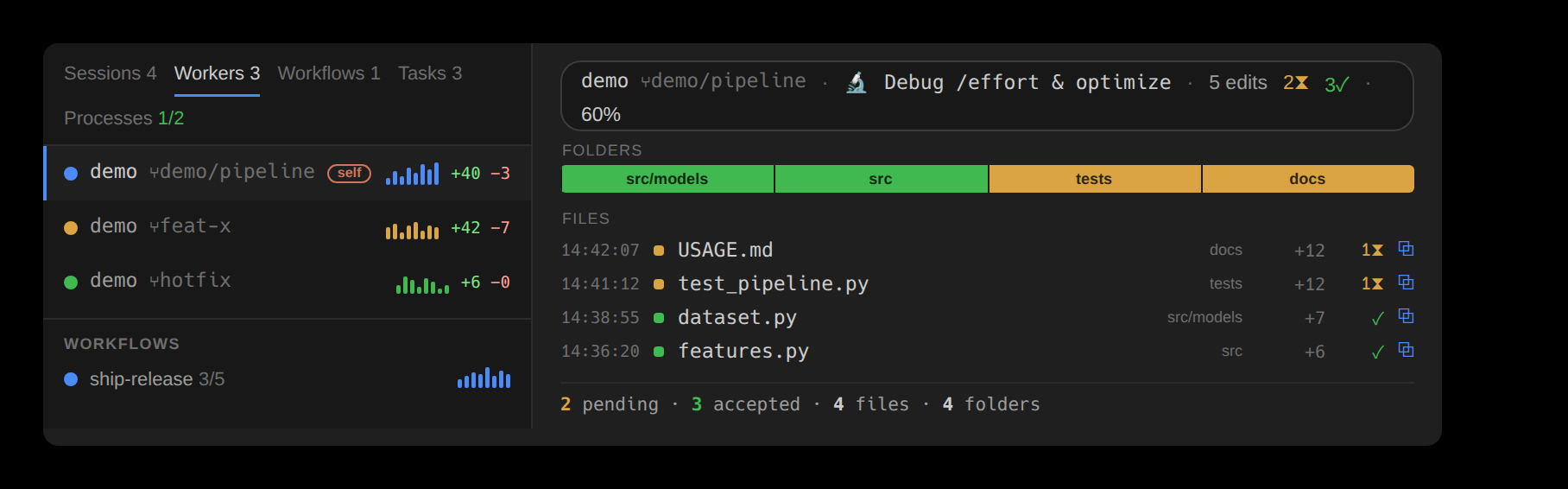
The change map is the summary the Overview draws for whatever is in scope — the session, one agent, one workflow run, or one prompt. It has two sections:
- The Folders strip — one tile per changed directory, ranked by lines changed and colored by review status. The top eleven show, with the rest behind a +K more tile that expands to all of them.
- The Files ledger — every changed file, ranked by churn, each stamped with the exact time of its last change.
A summary bar totals the scope and names any active filter.
Filter, sort, and age
The panel's toolbar narrows and orders what the ledger lists, inline — no pop-up. A search field takes a path fragment and matches it as a substring, or as a regular expression the moment the text carries regex syntax (^ $ * + ? ( ) [ ] { } | \); there is no mode to toggle. A filter dropdown narrows to one or more file-type buckets — Code, Tests, Config, Docs, Styles, Other — or to specific extensions, and its button names whatever is in force. A sort dropdown orders the files four ways — most recent first, oldest first, name A→Z, or name Z→A — and its button names the order in force. Each file also carries the exact time of its last change — 14:32:05 today, dated when older — so the freshest work reads at a glance. The same controls sit on the Overview and Traces panels in both editors and on the terminal app's review; a filter is a view, never a decision, so it changes what you see and never what the store holds.
Once you can see the changes, Keep, Undo, Accept & Reject cover every decision — from a single review unit to a whole session.